Earn Money Online From LibertaGia !
Today everyone struggling to earn money, to maintain their survival. Everyone want to earn as much money as they can. But you know for that purpose you have an education. Minimum you must be graduated, but if we take a look at average people do not have high education and cannot afford the costs of educational institutions such as high school or may be university. If you do full time job, then clearly you cannot continue education. There are also some part time jobs, but they are paying very less to full fill your daily needs.
Today I am gonna introduce you a most trusted MLM company titled as "LibertaGia". Here you can earn money by just doing daily tasks which are just viewing 15 Ads for 90 seconds. You can perform task in less than 20 minutes. So, Just imagine if you work daily for only 20 minutes you can earn money which will full fill your daily needs.
YES ! And Thats All For FREE ! You can join it for free. You can also buy membership to boost your earning potential, but as I mentioned above that people around the globe looking for a program where they can join for free and earn money. You have to view all 15 Ads in order to get paid !
SO GET STARTED !
FIRST OF ALL JOIN IT BY CLICKING ON BELOW BANNER !
AFTER THAT I WILL TRAIN YOU HOW TO PERFORM DAILY TASK !
This was just a little introduction to the company for full intro you may visit HERE to know more about the company !
FOLLOW THE SCREENSHOTS BELOW
Here you can see the login page.
2) Enter your Email , Password and the captcha code, after check the box below the captcha code titled "I accept the terms of use of LibertaGia" and click login.
It is a little complicated so therefore I decided to teach you from the start. Once you login. Follow the below screenshots.
3) As I wrote there on screenshot click those 3 lines , Menu will appear. Remember that sometimes it does not load properly so scroll down to see the your status as your seeing in above pictures.
4) Click On "TASKS" The page will redirect you to another page as you are seeing below.
5) In this step click on blue button titled "Click Here To Do The Task". As soon as you click the blue button another page will be opened in other tab.
There you see I highlighted something beyond the task. In the left side below the below button there is a table Date and Amount. Actually these are the money I earned by performing daily tasks. Do not worry about , I will show you how to do daily tasks.
[[[NOTE]]]]
Read All The Instructions Listed On The Above Page.
You must have to perform all tasks in order to get paid.
6) So finally you are gonna start to perform daily tasks. In the above screenshot you see I mark an arrow for "Click here to the task", click on that button. If you look closely there is another button titled "GO TO PAGE" , above this blue button you see a box. Actually this box shows the ID of the Ad/Task. As soon as you click on the button title "Click here to do the task". the empty box will be auto filled with some ID.
7) This step I already explained the "Step 6". Just have a look at the pictures you will understand. If Not , Leave comment !
8) When you click on the Ad , New tab will be opened and timer will start count-downing. Starting from the 90 and will end on 0. When the timer time ends you will see their a captcha code. Enter the captcha and click finish. Which will be shown in next screenshot.
NOTE: If the time does not start , simply reload the page.
9) I already explained this in Step 8. So have a look there if feeling confused.
10) CONGRATULATION ! You have successfully performed your first task. Now close this tab and see next screenshot.
11) As your seeing there that first task in the upper left side button turned green and titled "SUCCESS". This means that you have successfully performed your first task. So repeat the same method for all of the tasks.
REMEMBER:
Do not refresh the above page when performing tasks. If you reloaded you will have to do tasks from the beginning. That is if you have performed 14 tasks out of 15 and you reloaded , then you must have to do all the tasks from beginning. So, be careful and do not reload the above page while you are doing daily tasks. Also do not reload the BACKOFFICE page.
12) I performed 14 out of 15 tasks. So this one is the last to do. Lets See !
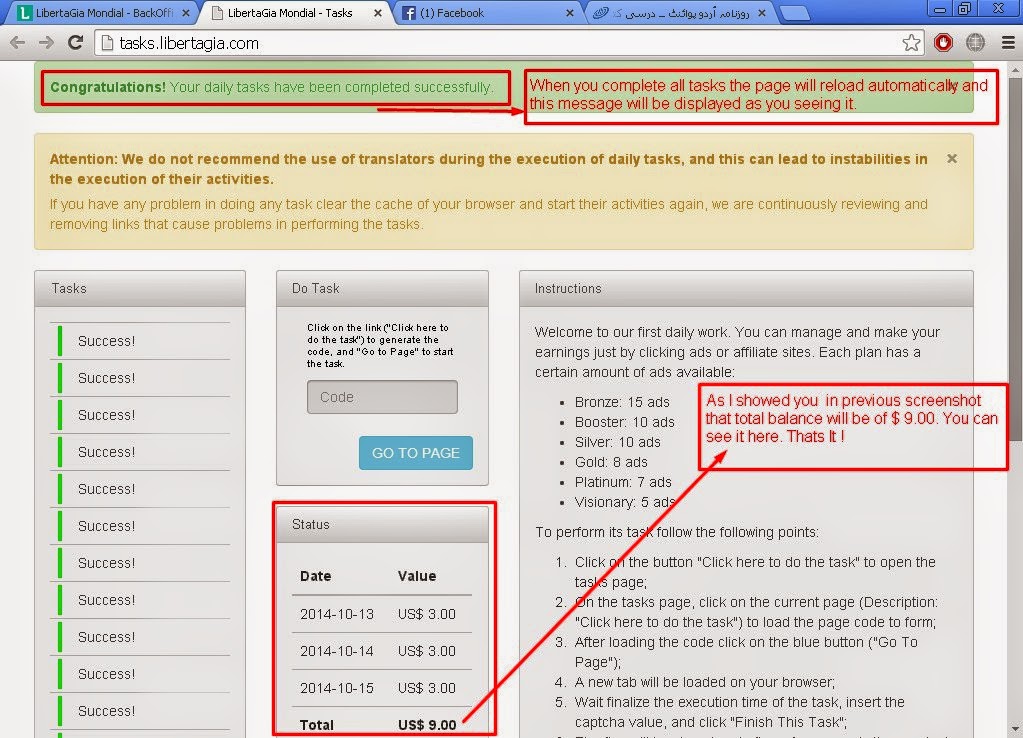
13) I performed all tasks. You see in the STATUS TABLE the amount now is $ 6.00 and after finishing, this page will be reloaded automatically and will update the status. In next screenshot you will see the amount $9.00 in total.
14) Yep ! You can see it ! Observe the above image closely and carefully. I hope you will understand.
Thats It !
Feeling Confused ? Leave Your Comment Below !
I will be there to help you !